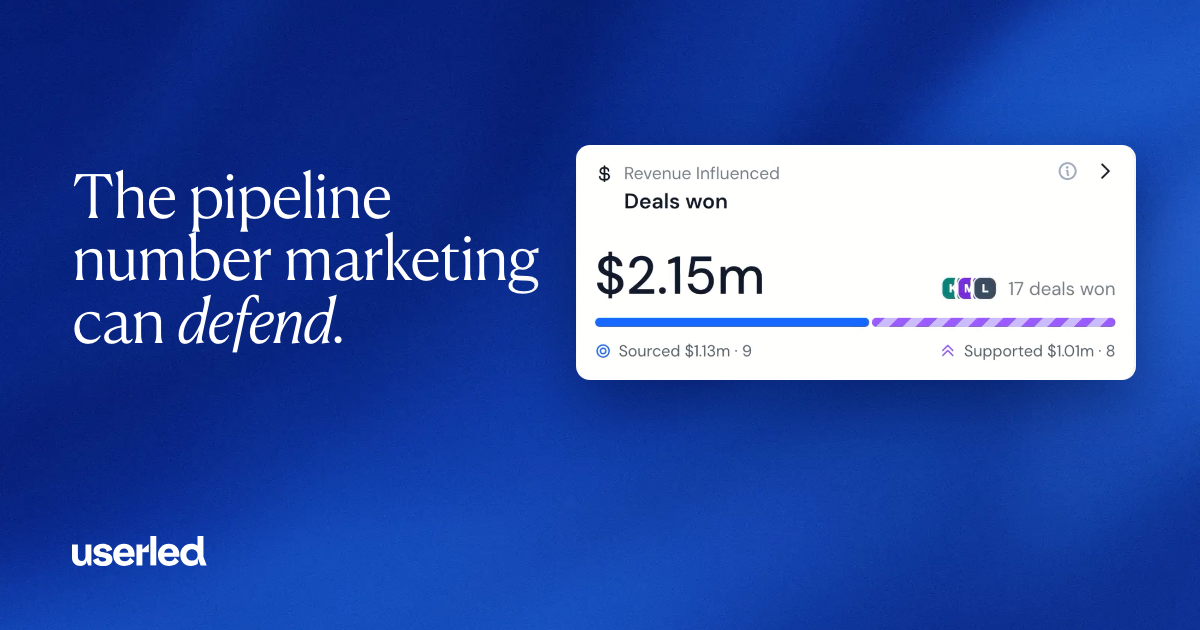

Attribution in Userled now shows every deal your campaigns sourced or supported, across every pipeline you run, in the same numbers your CRM reports. The result is a pipeline number marketing can take into a leadership meeting and defend line by line.
Most account-based programs can show what they launched: impressions, page visits, accounts engaged. Then leadership asks the only question that matters in a pipeline review. What did it move?
That question is where most dashboards stop. This release is built to answer it. Attribution sits in Revenue, the fourth part of the platform: Audiences decide who to act on, Orchestration and Activation run the campaigns, and Revenue shows what moved. The through-line of this release is proof.
Key takeaways
- Sourced or supported, for every deal. See which deals your campaigns reached before the opportunity opened, and which they kept warm while it was open.
- Every pipeline counts. New business, expansion, renewals and partner pipelines, on their own or all together.
- Every deal has a story. A timeline from first touch to close, with the ads and page visits behind it.
- 1:few LinkedIn ads now earn credit, next to 1:1 ads and page visits.
- Your numbers, not ours. Use your own CRM deal amount field, so the totals match what you already report.
Why account-based programs are hard to report on
The data was never the problem. Our research on what separates ABM programs found that the foundations under the AI, starting with data integration, decide results more than the AI itself. Your CRM knows every deal. Your ad platform knows every impression. Your pages know every visit. Nothing joins them at the account level, so the report ends up as two screenshots and a story.
Three things make it harder for account-based work.
1. The touches land on accounts, not leads. An ad reaches a buying group. Lead-based attribution waits for a form fill that often never comes, and sees nothing.
2. The program supports more than new business. ABM teams keep the buying group warm through the renewal and find the next team for the upsell. If attribution reads one pipeline, that work disappears.
3. The numbers don't match. When marketing's pipeline total differs from the number finance reports, the meeting is about the gap, not the result.
Sourced and supported: two kinds of credit
Attribution gives each deal one of two kinds of credit.
- Sourced: a Userled touch reached the account before the deal was created in your CRM.
- Supported: a Userled touch reached the account while the deal was open.
Both use a 90-day window today: a touch counts when it lands inside it.
The two answer different questions. Filter to 'Sourced' when leadership asks what marketing created. Keep both when the question is what marketing carried. Sourced tells you what you started. Supported tells you what you kept moving.
Every pipeline counts
Connect the pipelines you run in HubSpot or Salesforce and choose which ones to track: new business, expansion, renewals, partner. Look at each one alone, or switch to All pipelines for the full picture.
This was the request customers brought to us most often. ABM managers don't stop at the first deal, and their work on upsells and renewals deserves to show up in the same view as new business. Now it does.
Map your deal stages once. Any stage you don't map to Closed Won or Closed Lost counts as Open, so a new stage in your CRM never drops a deal out of the report.
Every deal has a story
Open any deal and you see its timeline: the first touch, every ad and page visit that followed, each stage change and the close.
A typical story reads like this. A page reached the account 43 days before the opportunity opened, inside the window. Twoconfirm visits later, the deal was created in the CRM. It moved through two stages in a month and closed won.
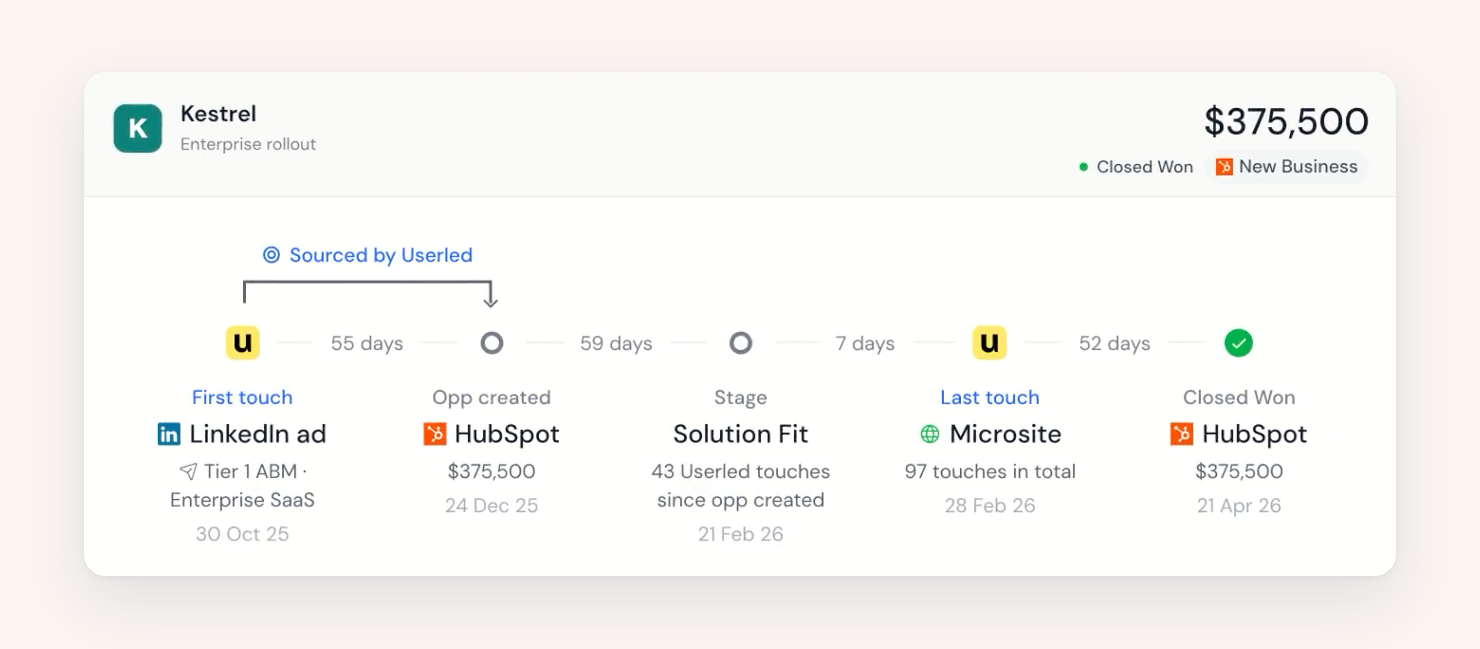
That is the version of attribution an account owner believes, because it is their deal, told in their CRM's dates. Download the story to share it in Slack or drop it into the QBR deck.
1:few LinkedIn ads now earn credit
Until now, only 1:1 LinkedIn campaigns earned credit. 1:few ad sets target a group of companies rather than one account, so their impressions never showed up against a deal.
LinkedIn now tells us which companies saw a 1:few ad. Userled matches each company to its account, and those impressions count as touches next to 1:1 ads and page visits, in the summary and in every deal's timeline.
One honest limit: LinkedIn reports 1:few company data about seven days late, so the most recent week fills in after the fact.
Your numbers, not ours
Attribution reads open, won and lost pipeline straight from your CRM. If you report on a custom field like Net New ARR instead of the standard amount, choose that field and Attribution uses it. Totals refresh in about 10 minutes and stay in sync with your CRM after that.
The number on the dashboard is the number in your board deck. It's how Fingerprint reports $13M of influenced pipeline: in pipeline, not page views.
What attribution tells you, and what it doesn't
Attribution shows where your campaigns reached the deals that moved. It does not prove that a campaign caused a deal. A 90-day window is generous, and some sourced deals would have opened anyway.
So pair it with a control. Compare the accounts your campaigns reached with similar accounts they didn't. If the reached accounts open deals faster or more often, you have a case leadership will accept. If they don't, you learn it before the budget conversation, not during it.
Set it up in three steps
- Go to Dashboard → Attribution → Configure attribution.
- Pick the CRM pipelines you want to track.
- Check the stage mapping and the deal amount field, so every deal lands in the right place.
Your CSM can walk you through it in one call.
What's coming next
- Choose your attribution window: 30, 60 or 90 days, or 6 months, as a workspace setting.
- 1:few backfill, so the most recent week of 1:few touches fills in.
- More touchpoints counted.
Every campaign makes the next one smarter. Attribution is how you'll know which ones did. For everything else we shipped this year, see the last release roundup.
Already on Userled? Open Attribution from your dashboard.
Not yet? Ready to win more deals? Talk to sales.
Generated £1.3M pipeline by focusing on UTM parameters personalisation.


Generated £1.3M pipeline by focusing on UTM parameters personalisation.